This is a part of series on structured concurrency: Part I (the general problem and TypeScript), Part II (Erlang and Elixir), Part III (Go and Rust), and Part IV (Kotlin and Swift).
In the earlier parts of this series I delved into how TypeScript, Erlang, Elixir, Go, Rust, Kotlin, and Swift each handle structured concurrency in practice such as spawning tasks, waiting for children to finish, propagating errors, and cancelling work cleanly. But I skipped over the the coordination models these languages are actually built on. For example, Go didn’t invent channels and Erlang didn’t invent actors. Both are engineering ideas that go back to the 1970s and 80s, and once you understand the original model, most of the “gotchas” you hit while using the language stop looking like bugs and start looking like predictable consequences of a design choice made decades ago.
This post explains where each model came from, what it actually guarantees and how structured concurrency sits on top of all of them as a separate concern. It includes PlexSpaces, an actor-and-tuplespace framework I’ve been building in Rust that takes a pragmatic stance on this history, e.g., bounded mailboxes instead of Erlang’s unbounded ones, first-in-first-out matching instead of the classic tuple-space model’s unspecified ordering, and one small API instead of forcing you to learn several calculi at once.
A short timeline
It helps to see these ideas in the order they actually appeared:
- 1973: Carl Hewitt proposes the actor model: small, isolated units of state that can only talk to each other by sending messages.
- 1978: Tony Hoare publishes Communicating Sequential Processes (CSP), a mathematical notation (a “process algebra”) with a precise definition of what it means for two processes to synchronize.
- 1985: David Gelernter publishes Linda, a coordination model built around a shared associative memory (the “tuple space”).
- 1986: Gul Agha’s book extends the actor model with a fuller algebraic treatment.
- 1986: Joe Armstrong and colleagues at Ericsson start building Erlang.
- Early-to-mid 2000s: event-loop async/await goes mainstream: Node.js’s callback-then-promise evolution.
- 2009: Go ships with goroutines and channels inspired by CSP.
- 2018 onward structured concurrency (Trio in Python, Kotlin’s coroutines, Swift’s
TaskGroup, Java’sStructuredTaskScope) formalizes a simple idea: a spawned task’s lifetime should never outlive the scope that spawned it.
Notice that everything on that list except the last item is about how work talks to other work. Structured concurrency is about a completely different question, i.e., how work’s lifetime gets tracked.
Concurrency and parallelism
Concurrency is a property of how a program is structured: multiple logically independent activities are in progress, possibly interleaved on a single CPU core. Parallelism is a property of execution: things are genuinely happening at the same time, which requires more than one core. You can have concurrency without parallelism like Node.js’s single-threaded event loop juggling many pending requests on one core. You can also have parallelism without concurrency like a tight SIMD loop doing the same arithmetic on many numbers at once has no interleaved independent logic at all. Go’s own documentation defines it as: concurrency is about dealing with lots of things at once, parallelism is about doing lots of things at once. Goroutines give you concurrency; whether that concurrency turns into real parallelism depends on GOMAXPROCS and how many cores are actually available.
This matter for CSP and actors because both are concurrency models and neither one is “more parallel” than the other. What actually differs between them is how they structure communication.
Five models, one spectrum of coupling
Every concurrency model is answering the same underlying question, i.e., how does one unit of work talk to another one.
| Model | Origin | How units talk | Coupling | Formal backing |
|---|---|---|---|---|
| CSP | Hoare, 1978 | Synchronous rendezvous on a named channel | Time-coupled | Full algebra, checked by tools like FDR |
| Go-style CSP | Go, 2009 | Channel, synchronous or buffered | Time-decoupled if buffered | None |
| Actor model | Hewitt 1973 / Erlang 1986 | Async message to a named address | Identity-coupled, time-decoupled | Partial (Clinger, Agha) |
| async/await | Node.js/C#/Python event loops | Future/promise handle | Time-decoupled | None |
| Linda / tuple space | Gelernter, 1985 | Tuple matched by content | Fully decoupled – no identity, no timing | Partial (Klaim’s semantics) |
| Structured concurrency | Trio/Kotlin/Swift, 2018+ | Whatever the underlying model uses | Lifetime-coupled to a scope | None |
CSP: the algebra
Before getting into Go’s implementation, let me explain algebra in CSP. I’ve written before about algebraic effects like resumable exceptions in OCaml 5 / Koka that let a function declare what it needs without saying who provides it. But algebra in CSP is a process algebra: a small set of operators like sequence, choice, parallel composition, hiding with equational laws. Because those laws exist, you can prove two CSP process descriptions behave identically. Tools like FDR (Failures-Divergences Refinement) do this mechanically, e.g., you describe your system as CSP processes, describe a specification as another CSP process, and FDR checks whether the implementation actually refines the spec, across every possible interleaving.
Here’s what that looks like for a scatter-gather pattern, an orchestrator firing off requests to several workers and collecting exactly K responses:
-- Specification: orchestrator collects exactly K results then stops
SPEC = scatter -> (collect -> collect -> collect -> STOP)

-- Implementation: N workers communicate via channels
WORKER(i) = request.i -> response.i -> STOP
SYSTEM = (||| i : {0..4} @ WORKER(i))
         [| {| response |} |]
         COLLECTOR(3)
COLLECTOR(0) = STOP
COLLECTOR(k) = response?i -> COLLECTOR(k-1)

-- FDR checks: assert SYSTEM [T= SPEC (trace refinement)
-- This PROVES: no deadlock, no livelock, exactly K responses collected
A handful of operators do almost all the work here:
| CSP Operator | Meaning | What FDR Proves |
|---|---|---|
P ? Q | External choice: the environment decides | Deadlock-freedom: at least one branch is always available |
P ? Q | Internal choice: the process decides nondeterministically | Liveness: both branches are eventually reachable |
P ? Q | Parallel composition, synchronized on shared events | No protocol deadlock between P and Q |
P ; Q | Sequential composition: Q starts only after P terminates | Termination: P always reaches STOP |
P \ A | Hiding: internal events in set A become invisible | Divergence-freedom: no infinite internal loops |
In other words you can model your protocol in CSP and let FDR check every possible interleaving for you. For the scatter-gather pattern specifically, FDR would catch, automatically, before any code runs:
- A worker that never responds (a deadlock)
- A collector that waits for more responses than the workers can ever produce (also a deadlock)
- A timeout path that accidentally creates an infinite retry loop (a livelock)
Go and Rust can’t do any of this because the as soon as you add a buffer (make(chan int, 5)) or an async boundary, you’ve left the strictly synchronous world that FDR reasons about. Go’s race detector can find data races at runtime, after the fact. Rust’s borrow checker prevents a whole class of shared-state bugs at compile time. But, neither one can prove protocol-level, whole-system deadlock-freedom the way FDR can for pure CSP.
Go’s channels
Hoare’s CSP defines communication as synchronous by construction where a send and its matching receive aren’t two separate events that happen to line up in time but they’re the same event in the algebra. Go’s unbuffered channel matches that faithfully: ch <- x and <-ch really do rendezvous. A buffered channel doesn’t, and that one divergence from the original model explains most of the sharp edges Go developers run into. Also, real CSP processes have no persistent identity beyond the algebra describing them, and channels are closer to anonymous synchronization events than to objects you hold a reference to. Go’s channels, by contrast, are first-class values that you create one, pass it into ten different functions, and any of them can close it. Nothing in the language enforces “exactly one owner, exactly one closer” and this is the seed of several of the gotchas below.
func worker(jobs <-chan int, results chan<- int) {
    for j := range jobs {
        results <- j * j
    }
}

func main() {
    jobs := make(chan int, 5)
    results := make(chan int, 5)
    go worker(jobs, results)

    for i := 1; i <= 5; i++ {
        jobs <- i
    }
    close(jobs) // safe: only the sender closes, and no sends follow

    for i := 0; i < 5; i++ {
        fmt.Println(<-results)
    }

    // jobs <- 6 // panics — sending on a closed channel always panics,
                 // whether or not anything is still listening
}
Three more gotchas that Go’s compiler won’t warn you about:
- Receiving from a closed channel never panics. It returns the zero value and
ok == falseimmediately instead of blocking. - A nil channel blocks forever, on both ends, with no panic. Occasionally this is useful on purpose but if it happens to an uninitialized struct field, it results in permanent hang with no error message pointing you at the cause.
- Goroutines have no structure by default.
go func(){}()creates nothing that ties that goroutine’s lifetime to the caller. A goroutine permanently blocked on a channel operation is invisible to the garbage collector and invisible to Go’s deadlock detector. It causes a partial leak where the program running fine, with one goroutine stuck forever in the background.
One place Go actually stayed close to the algebra: select. Hoare’s algebra has external choice (?) as a first-class operator, and select‘s randomized tie-break among multiple ready cases matches CSP alegbra.
select {
case job := <-jobs:
    handle(job)
case <-ctx.Done():
    return ctx.Err() // structured cancellation, Go-style
default:
    // non-blocking probe — CSP has no built-in default arm,
    // but this is the standard way to build one
}
Best practices that have converged around Go’s channels
- Confine, don’t share. Exactly one goroutine should own a channel’s write side and be the one to close it.
- Thread
context.Contextthrough every long-running goroutine. Aselectthat never watchesctx.Done()is a goroutine leak waiting to happen. - Size buffered channels as semaphores for bounding concurrency (worker pools, rate limiting) instead of letting goroutines fan out unbounded.
- Use
errgroup(or equivalent) for propagating the first error and coordinating cancellation across a group of goroutines, instead of hand-rolling error channels. - Treat structured concurrency as the governing principle anyway, even without language support: a goroutine’s lifetime should be scoped to, and never outlive, the function or request that spawned it.
- Instrument the concurrency itself: race detector in CI, plus metrics and tracing on channel operations and goroutine counts in production because concurrency bugs are nondeterministic and hard to catch with a handful of unit tests.
Actors: isolation you get structurally
Actors give you a different, and in some ways weaker, guarantee than CSP but they give it to you structurally. An actor’s state is private, and it processes exactly one message at a time. There is no data race inside one actor, full stop. Instead of “processes synchronizing on named events,” Hewitt’s model says: everything is an actor. Each actor has a private mailbox (unbounded and asynchronous), private state and three things it’s allowed to do on receiving a message: send messages to other actors, create new actors, and decide how to handle its next message. There’s no synchronous handshake requirement anywhere.
Here’s a worker pool in Erlang, matching the crawler pattern from Part II of this series:
-module(worker_pool).
-export([start_pool/1, dispatch/2, worker_loop/1]).

start_pool(N) ->
    [spawn_link(fun() -> worker_loop(0) end) || _ <- lists:seq(1, N)].

worker_loop(Count) ->
    receive
        {work, Job, From} ->
            From ! {result, do_work(Job)},
            worker_loop(Count + 1);
        {status, From} ->
            From ! {count, Count},
            worker_loop(Count)
        % No catch-all clause yet — see the gotcha below
    end.

dispatch(Pid, Job) ->
    Pid ! {work, Job, self()},
    receive
        {result, R} -> R
    after 5000 ->
        {error, timeout}
    end.
Two Erlang-specific gotchas worth knowing before you ship anything like this:
- Selective receive skips a non-matching message instead of discarding it.
receivescans the mailbox in arrival order against your clauses. Anything that matches none of them just sits there, and the nextreceivecall starts scanning from the front all over again. Left unchecked, this is O(n²) behavior over time as junk quietly accumulates. The fix is a catch-all clause:
worker_loop(Count) ->
    receive
        {work, Job, From} -> ...;
        {status, From} -> ...;
        Other ->
            logger:warning("unexpected message: ~p", [Other]),
            worker_loop(Count)  % drop it, don't let it pile up
    end.
- Mailboxes have no bound by default.
!never blocks in Erlang and there’s no rendezvous. If a producer outpaces a slower worker, the worker’s mailbox just keeps growing until memory runs out. In practice, you either switch to a blockinggen_server:callfor anything where backpressure actually matters, or you monitorprocess_info(Pid, message_queue_len)yourself and shed load manually.
Supervision is the actor model’s answer to fault structure where a supervisor’s children are linked to it, and a crash triggers a restart strategy instead of taking the whole system down with it. But it is structured fault handling, not structured lifetime tracking. A supervisor doesn’t block waiting for its children to finish instead supervision answers “what happens when a child crashes.” Erlang also provides a location transparency, e.g., an Erlang Pid looks identical whether it points to a local process or one on another node ( Pid ! Msg). But that transparency is syntactic, not operational. A remote send can fail with nodedown or badrpc, latency is never zero so you cannot skip handling the failures that only show up once the mailbox is across a network.
Where actors are simpler than channels
A few structural reasons actors tend to feel simpler in practice than channel-based code:
- Ownership is enforced by the design itself. There’s no equivalent of “who’s allowed to write to this channel,”, every interaction is a message dropped into a mailbox that only the receiving actor ever drains.
- There’s no close semantics to get wrong. Actors don’t have anything like Go’s send-on-closed-panics / double-close-race. An actor’s lifecycle like start, running, terminated is a small, well-understood state machine, and you can monitor/link actor for detecting unexpected crash.
- Failure handling is first-class. Supervision trees and let-it-crash give you a systematic answer to “a worker just crashed, now what?” Go’s answer is
recover()scattered wherever someone remembered to put it or manualerrgroup/context-cancellation wiring to propagate failure to siblings. - Location transparency. With channels, you need to build remoting capability yourself. With actors, it’s often just a deployment decision.
Where actors are not automatically simpler: mailbox-based concurrency can hide backpressure problems, e.g., an actor with an unbounded mailbox can happily accept messages faster than it processes them and quietly balloon memory. Reasoning about message ordering across several independent actors’ mailboxes is also harder than reasoning about a single shared channel’s FIFO order. CSP’s synchronous rendezvous gives you stronger backpressure for free where an unbuffered send blocks until the receiver is ready (some of modern actor runtimes like Akka support mailbox bounding).
Best practices for actor systems
- Bound mailboxes and monitor mailbox depth as a first-class metric, e.g., an unbounded mailbox is the actor world’s version of an unbuffered-channel leak.
- Design supervision hierarchies deliberately like one-for-one, one-for-all, rest-for-one.
- Keep actor state small and serializable if you ever want migration or persistence.
- Use location transparency deliberately, not accidentally.
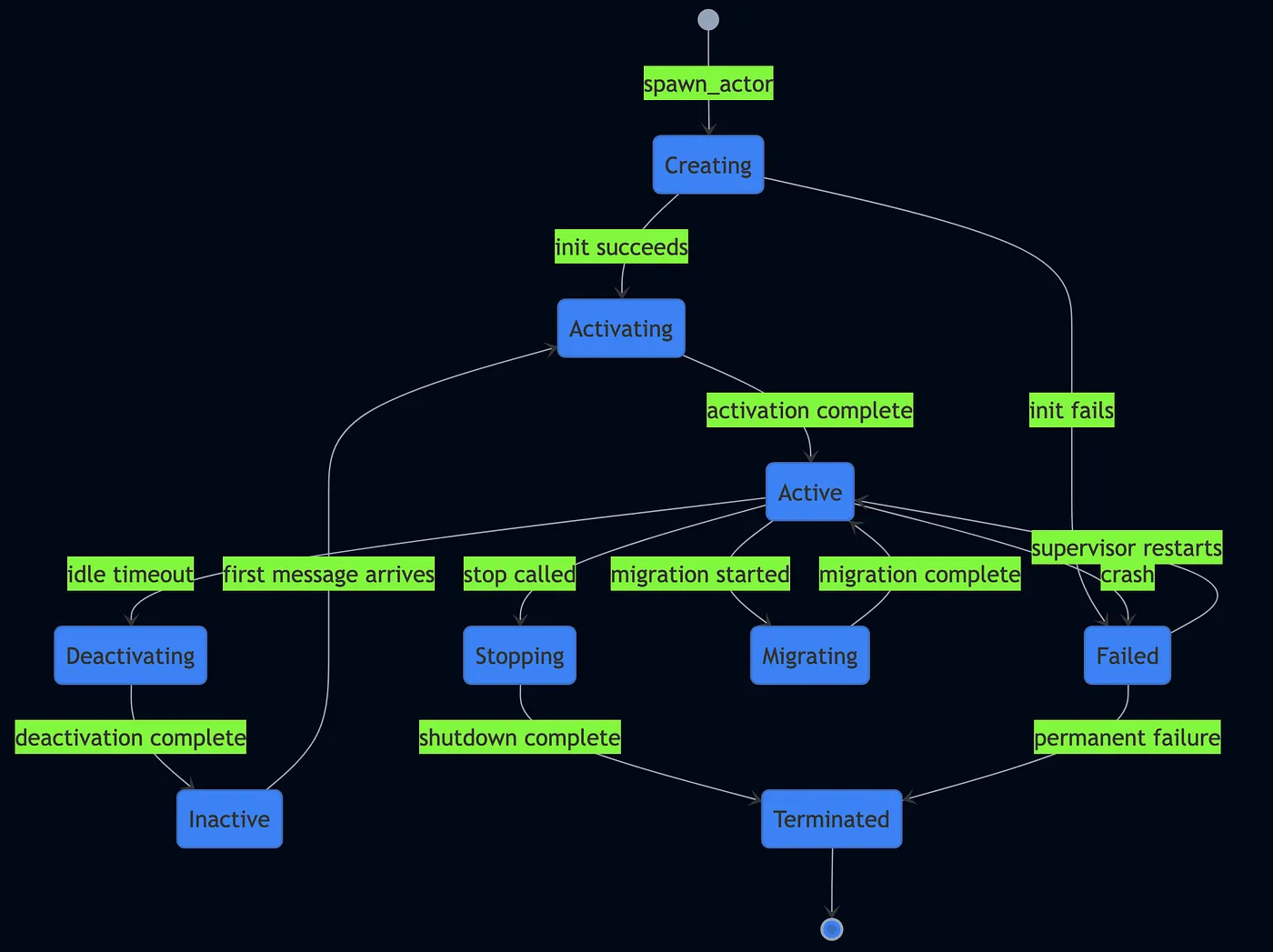
CSP/channels fit use cases when you have a fixed, well-understood pipeline topology like stream-processing stages, worker pools with a known fan-out shape. Actors suite when your system’s topology is dynamic like agents spawning agents and where failure isolation matters. I have built PlexSpaces, an actor-based framework, with facets for durability, supervision, and virtual-actor placement based on these lessons. For example, it provides location transparency, failure isolation, and the backpressure/mailbox-bounding. Here is how an actor lifecycle is managed in PlexSpaces:
async/await
Async/await never got a formal algebra or expressiveness proof. It’s syntactic sugar over futures and promises, running on a single-threaded event loop or a thread-pool-backed task scheduler. Within one event loop, there’s no preemption between await points, which quietly eliminates a lot of classic race conditions but it introduces its own flavor of the “who’s tracking this” problem:
async function processOrder(order) {
  sendConfirmationEmail(order); // fire-and-forget — no await!
  return { status: "accepted" };
}
sendConfirmationEmail here returns a promise nobody is holding onto. If it rejects, nothing catches it and in most runtimes that becomes an unhandled-rejection warning nobody reads. If the process exits before it resolves, it just silently never finishes. Structurally, this is the exact same failure as an unstructured Go goroutine, a unit of work whose lifetime nothing owns. Promise.all and asyncio.gather fix this for the cases you remember to wrap explicitly.
This is also where the “function coloring” problem lives, which I covered in the ADTs and algebraic effects post: once a single function is async, every caller up the chain has to become async too. Algebraic effects unrelated to CSP’s process algebra are one proposed fix: separate what a function needs from who provides it.
Linda Memory Model
Linda coordinates through a shared associative memory called a tuple space, with four operations:
out(t):write a tuple, don’t blockin(t): block until a tuple matches your template, then atomically remove itrd(t): block until a tuple matches, but leave it there for otherseval(t): spawn a computation; its eventual result becomes an ordinary tuple once it finishes
Neither side of a Linda interaction needs to know who the other one is. A producer can out() a tuple long before any consumer even exists. This is “generative communication”, data just floats in the shared space until something matching comes looking for it:
// Pseudocode — classic Linda fan-out/fan-in
for i in 0..n:
    eval(("result", i, compute(i)))    // spawn n concurrent computations

count := 0
while count < n:
    in(("result", ?i, ?r))              // blocking, destructive, matched by content
    collect(r)
    count += 1
Notice there’s no worker identity anywhere in that collector loop at all. This is suitable for use cases like master/worker fan-out, blackboard-style coordination, barrier synchronization by counting tuples as they arrive. Linda has two gotchas of its own:
- Which matching tuple you get is unspecified. If two tuples both match your template, the classic Linda spec never says which one
in()hands you. eval()returns nothing. No handle, no future, no promise object of any kind. The only way to know a spawned computation ever finished is to already know the shape of its result tuple and read it.
These issues prevented Linda from going mainstream but its associative memory primitives are natural for coordination related use cases.
Structured concurrency
Kotlin’s coroutineScope, Swift’s TaskGroup, and Java 21’s StructuredTaskScope bind a spawned task’s lifetime to the lexical scope that spawned it. The scope literally cannot exit until every child has finished whether error or not. None of the five communication models above give you that by default:
| Model | What tracks a spawned unit’s completion |
|---|---|
| CSP / Go | Nothing: go func(){}() has no parent link at all |
| Actors / Erlang | Supervision restarts a crashed child, but nothing blocks waiting for a healthy one to finish |
| async/await | Nothing, an un-awaited promise just runs, or silently fails |
| Linda | Nothing, eval() doesn’t even return a handle to check |
This is exactly why structured concurrency reads as an add-on layer rather than another communication model. It’s a lifetime discipline you can apply on top of channels, actors, promises, or tuples, e.g., Trio applies it to async/await, Kotlin applies it to coroutines that might be built on channels.
How PlexSpaces answers these gotchas
Most frameworks inherit one of above models’ specific historical rough edges along with its strengths. PlexSpaces is a actor-and-tuplespace framework I’ve been building, and wrote about in more depth here. It deliberately combines actors and Linda rather than picking one, but it doesn’t reproduce either one’s original sharp edges just for the sake of purity. Here’s the mapping from “gotcha described above” to “the specific fix PlexSpaces makes”:
| Gotcha, as described above | PlexSpaces’ pragmatic answer |
|---|---|
| Erlang mailboxes have no bound, so a fast producer can grow one until memory runs out | Bounded mailboxes. An actor’s inbox has a real, configurable limit, a producer that outpaces its consumer gets backpressure instead of an unbounded memory leak. |
| Classic Linda leaves the order of matching tuples unspecified, so which one you get is nondeterministic by design | FIFO tuple matching. When more than one tuple matches a template, PlexSpaces returns them in the order they were written, not an arbitrary one, removing nondeterminism-by-specification. |
| Full CSP requires learning a process algebra; full Linda requires learning a four-primitive calculus bolted onto a host language; Erlang requires learning OTP’s supervision idioms | One small API surface. Actors expose a handful of primitives like send, ask, and the tuple-space operations. |
eval() in classic Linda returns no handle, so a spawned computation’s completion is untracked by default | Because the “worker” side of a fan-out/fan-in in PlexSpaces is an ordinary supervised actor rather than a bare eval(), its lifetime is owned by a supervisor even though its result is collected the Linda way. |
| A crash mid-task loses whatever work was in flight, a concern none of CSP, actors, or Linda’s formulations really address | Durability journaling underneath everything. Messages are journaled at the actor-framework level, below application code, so a crash doesn’t silently lose in-flight work, replay picks the actor back up where it left off. |
A fan-out/fan-in worker pool shows the combination directly:
// Coordinator spawns N supervised, bounded-mailbox workers.
for i in 0..n {
    spawn_with_facets(
        &ctx, service_locator.clone(),
        "worker", "default",
        Worker::new(i), vec![],
    ).await?;
}

// Coordinator collects results Linda-style — associative, FIFO,
// no ActorRef needed for any individual worker.
let mut collected = 0;
while collected < n {
    let tuple = ctx.tuple_space()
        .in_(template!["result", Wildcard, Wildcard])
        .await?;
    collect(tuple);
    collected += 1;
}
The workers are ordinary supervised actors, restartable, journaled, isolated, with bounded mailboxes so a slow coordinator can’t be flooded. The result collection is Linda-style associative matching, but FIFO instead of unspecified, so results come back in the order the workers actually produced them rather than in an arbitrary one.
Example: scatter-gather with a timeout, across three models
Comparisons are easier to trust when they’re concrete rather than abstract, so I implemented the same pattern, scatter-gather with a timeout across all three approaches. The problem: fan requests out to N services, collect the first K responses within a deadline, then cancel everything else, guaranteed. This is the pattern underneath every hedged-request system, every parallel-search aggregator, and every timeout-bounded fan-out you’ve seen in production.

Go CSP: the naive version leaks goroutines
The code below shows the mistake almost everyone makes on the first pass like spawning goroutines with no cancellation path at all:
func ScatterGatherNaive(services []time.Duration, firstK int) []ServiceResponse {
    ch := make(chan ServiceResponse, len(services))

    for i, latency := range services {
        go func(id int, lat time.Duration) {
            time.Sleep(lat)
            ch <- ServiceResponse{ServiceID: id, Data: fmt.Sprintf("response-%d", id)}
        }(i, latency)
    }

    results := make([]ServiceResponse, 0, firstK)
    for range firstK {
        results = append(results, <-ch)
    }
    // BUG: N-K goroutines still running in background with no cancellation path
    return results
}
The fix combines context.WithTimeout with errgroup to get a real structured lifetime:
func ScatterGatherStructured(services []time.Duration, firstK int, timeout time.Duration) []ServiceResponse {
    ctx, cancel := context.WithTimeout(context.Background(), timeout)
    defer cancel()

    var mu sync.Mutex
    results := make([]ServiceResponse, 0, firstK)

    g, ctx := errgroup.WithContext(ctx)
    for i, latency := range services {
        g.Go(func() error {
            resp, err := simulateService(ctx, i, latency)
            if err != nil { return nil }
            mu.Lock()
            defer mu.Unlock()
            if len(results) < firstK {
                results = append(results, resp)
                if len(results) >= firstK { cancel() }
            }
            return nil
        })
    }
    _ = g.Wait() // All goroutines done — structured lifetime guarantee
    return results
}
errgroup.Wait() guarantees every goroutine finishes before the function returns, and context.WithTimeout propagates cancellation down to the slow workers, so nothing leaks. The catch: you still have to write that plumbing by hand every time.
Go CSP gotchas, side by side with the CSP algebra:
| Gotcha | What happens | CSP algebra equivalent |
|---|---|---|
| Goroutine leak | Blocked goroutines run forever, invisible to GC and deadlock detector | N/A |
| Nil channel recv | Blocks forever – no panic, no warning | N/A |
| Nil channel send | Also blocks forever silently | N/A |
| Send on closed | Runtime panic – unrecoverable crash | N/A |
| Recv from closed | Returns zero value + ok=false | N/A |
| Buffered vs unbuffered | Breaks rendezvous = breaks the formal reasoning about synchronization | Buffered channels aren’t part of original CSP |
| Select non-determinism | A random ready case is chosen when several are ready | CSP’s external choice (?) is nondeterministic by design |
Runnable, with tests: native/gotchas_test.go — 8 tests demonstrating every row above as failing-then-fixed code.
// Gotcha: Goroutine leak — spawned workers block forever on an unread channel
ch := make(chan int)
for i := 0; i < 10; i++ {
    go func(id int) { ch <- id }(i)  // blocks forever — no reader
}
// 10 goroutines leaked: invisible to GC, invisible to deadlock detector

// Gotcha: Nil channel blocks forever (both directions, no panic)
var ch chan int  // nil
<-ch            // blocks forever on recv
ch <- 42        // blocks forever on send

// Gotcha: Send on closed panics, recv from closed returns zero (asymmetric!)
ch := make(chan int, 1); close(ch)
ch <- 1         // PANIC: send on closed channel
v, ok := <-ch   // v=0, ok=false — no panic, just zero value

// Gotcha: Buffered channel breaks rendezvous
buffered := make(chan int, 5)
buffered <- 1   // sender proceeds without receiver — not CSP anymore
Pure Rust: a Nursery, and select! as a guarded command
Rust gives you ownership-enforced isolation without shared state by default but it doesn’t give you structured lifetime by default either. The Nursery type below binds a group of spawned tasks to a scope explicitly:
pub struct Nursery<T: Send + 'static> {
    join_set: JoinSet<T>,
}

impl<T: Send + 'static> Nursery<T> {
    pub fn spawn<F>(&mut self, future: F)
    where F: Future<Output = T> + Send + 'static {
        self.join_set.spawn(future);
    }

    /// Wait for first K tasks OR timeout — then cancel everything else.
    pub async fn wait_first_k_or_timeout(mut self, k: usize, timeout: Duration) -> Vec<T> {
        let mut results = Vec::with_capacity(k);
        let deadline = tokio::time::Instant::now() + timeout;
        loop {
            if results.len() >= k { break; }
            tokio::select! {
                maybe = self.join_set.join_next() => {
                    match maybe {
                        Some(Ok(value)) => results.push(value),
                        Some(Err(_)) => continue,
                        None => break,
                    }
                }
                _ = tokio::time::sleep_until(deadline) => { break; }
            }
        }
        self.join_set.abort_all(); // Structured cleanup — cancel stragglers
        results
    }
}
tokio::select! maps almost directly onto CSP’s guarded command / external choice operator, whichever branch is ready first wins, and the biased; modifier gives you deterministic priority ordering (unlike Go’s deliberately random tie-break):
let results = scatter_gather_csp(&services, 3, Duration::from_millis(300)).await;
// Nursery guarantees: all children cancelled before scope exits
Ownership prevents shared-state bugs entirely, at compile time. JoinSet::abort_all() gives you a real, guaranteed cancellation. The nursery pattern gets you structured lifetime with essentially no runtime overhead. The catch: there’s no nursery built into the standard library and there’s still no formal algebra backing any of it (no FDR-style prover checking).
Rust CSP gotcha, demonstrated in csp_channels/src/scatter_gather.rs:
// Gotcha: Naive tokio::spawn has no parent link — tasks leak
let mut handles = vec![];
for svc in &services {
    handles.push(tokio::spawn(simulate_service(svc)));
}
// If we return early, spawned tasks run forever — no cancellation

// Fix: JoinSet provides structured lifetime
let mut join_set = JoinSet::new();
for svc in &services { join_set.spawn(simulate_service(svc)); }
// On drop or abort_all(), all tasks are cancelled — guaranteed
PlexSpaces: supervised lifetime plus decoupled collection
This is where actor supervision (structured fault handling) and Linda-style tuple-space coordination (decoupled result collection) get combined. Start with thin Linda-style wrappers over the tuple-space host functions:
// Linda-style thin wrappers over tuplespace host functions
fn linda_out(fields: &[Value]) -> Result<(), String> {
    let request = WriteRequest { tuples: vec![json_to_tuple(fields)?], .. };
    ts_write(&request.encode_to_vec()).map(|_| ())
}

fn linda_in(pattern: &[Value]) -> Result<Option<Vec<Value>>, String> {
    let request = ReadRequest { template: Some(to_pattern(pattern)?), take: true, .. };
    let bytes = ts_take(&request.encode_to_vec())?;
    Ok(decode_response(&bytes)?.first().map(to_json_array))
}
The orchestrator scatters by spawning supervised workers, then sets its own timeout with a self-message:
// Scatter: spawn N workers under supervisor
for i in 0..num_services {
    spawn("actor-csp-wasm", &format!("worker-{i}"), "", &init_json)?;
    send(&worker_id, "cast", &work_payload)?;
}

// Set timeout — send_after fires a collection message to self
send_after(timeout_ms, "cast", &collect_msg)?;
Each worker writes its result to the shared tuple space, with zero knowledge of who’s collecting it:
// Worker: Linda OUT — write result tuple to shared tuplespace
linda_out(&[
    Value::String("result".into()),
    Value::String(request_id.into()),
    Value::Number(service_id.into()),
    Value::String(result_data),
])?;
And gathering reads back whatever arrived in time, then explicitly tells the supervisor to stop the rest:
// Gather: Linda RD-ALL — collect whatever arrived before timeout
let results = linda_rd_all(&["result", request_id, *, *])?;
// Structured cleanup: stop remaining workers via supervisor
for wid in &worker_ids { stop(wid)?; }
Workers never need to know who’s collecting their results, that’s the Linda decoupling doing its job. The supervisor guarantees the worker lifecycle end to end, e.g., a crashed worker restarts automatically under a OneForOne strategy. Bounded mailboxes keep a slow coordinator from getting flooded. FIFO tuple matching makes the collection step deterministic instead of an open question.
The three approaches, side by side
| Property | Go CSP (errgroup) | Rust (Nursery/select!) | PlexSpaces (actors + Linda) |
|---|---|---|---|
| Cancellation | context.Cancel() propagated | JoinSet::abort_all() | stop() via supervisor |
| Structured lifetime | g.Wait() blocks | Nursery scope exit | Supervisor manages lifecycle |
| Backpressure | Buffered channel capacity | Channel capacity | Bounded mailbox |
| Failure handling | errgroup collects first error | JoinError on abort | Supervisor restarts crashed worker |
| Coupling | Workers know the result channel | Workers know the result type | Workers only know the tuple shape (Linda) |
| Formal backing | None | None | None (but FIFO + bounded mailboxes removes two classes of nondeterminism) |
| Distribution | Single process only | Single process only | Multi-node, transparently |
Full runnable examples with tests live at: examples/rust/embedded/csp_channels, examples/go/apps/csp_structured/native, and examples/rust/apps/actor_csp.
One more actor-model gotcha, demonstrated via supervisor behavior
// Gotcha: Unbounded mailbox — fast producer OOMs the consumer
// Fix: PlexSpaces uses bounded mailboxes with a configurable limit

// Gotcha: No structured lifetime — actors are async, no scope to wait on
// Fix: Supervisor + explicit stop() for child actors after collection

// Gotcha: Orphaned actors — a spawned actor runs forever if nobody stops it
// Fix: OneForOne supervisor manages worker lifecycle; orchestrator calls stop()
The tldr;
- CSP has real algebra and real tooling (FDR) behind it. Go borrows the vocabulary but drops the proof the when you add a buffer.
- Actors have partial formal treatment and isolation by construction, but unbounded mailboxes and selective-receive skip are real, sharp edges the model doesn’t protect you from on its own.
- async/await never had formal backing at all, and its fire-and-forget promise is the exact same “who’s tracking this” bug as an unstructured goroutine.
- Linda is the most decoupled model on this list and the least adopted. The original spec leaves match order unspecified and spawned work untracked.
- Structured concurrency isn’t a another concurrency model, instead it’s a lifetime discipline layered.
- PlexSpaces’ bet is that you don’t have to inherit every historical rough edge along with the good ideas like bounded mailboxes, FIFO matching, and one small unified API let it combine actor supervision with Linda’s decoupled coordination.
The rest of the series
- Part I — the general problem, concurrency constructs, and TypeScript
- Part II — Erlang and Elixir
- Part III — Go and Rust
- Part IV — Kotlin and Swift
- Building a Durable Actor Framework for Polyglot Serverless Apps
- 20+ Production Patterns for Distributed AI Agents Using Actors and TupleSpaces
- Building an Agent Harness and Eval Pipeline with Durable Actors
- Building a Self-Improving AI Agent with Durable Actors: MiniHermes
- Building Mini OpenClaw: Secure AI Agents with Actors, WASM, and Supervision
- Making Bad State Impossible: A Practical Guide to ADTs and Algebraic Effects
- Building PlexSpaces: Decades of Distributed Systems Distilled Into One Framework
Code for everything above: github.com/bhatti/PlexSpaces


